Stop losing customer requests on scraps of paper.

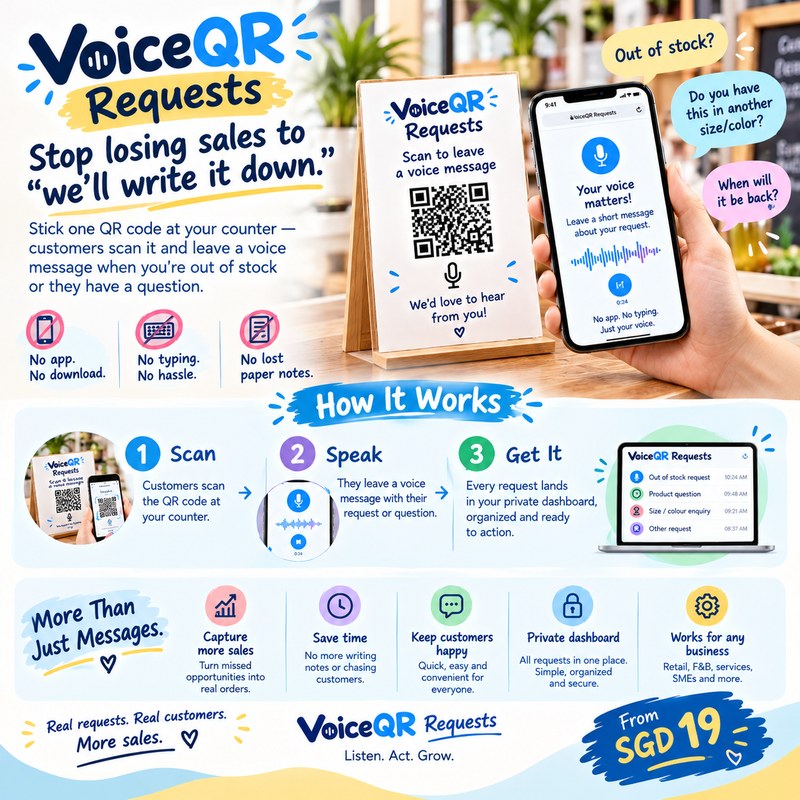
Stick one QR code at your counter. When you're out of stock, customers scan it and leave a quick voice message with their name and number — it lands straight in your private staff inbox, timestamped, organized, and impossible to misplace.
VoiceQR Requests
How it works

No app for your customer. No extra step for your staff.

01

Stick up your QR code

One code at the counter, fitting room, or wherever the question usually comes up.

02

Customer scans & speaks

They record what they need — "do you have this in size M?" — and optionally leave a name and number. No app, no account, no typing.

03

Your staff triage it

Every message lands in one private dashboard with a timestamp. Mark it New, In Progress, Resolved, or Closed as you work through it.

Why not just write it on paper?

Paper gets lost. This doesn't.

A notepad at the counter

  • Gets misplaced, thrown out, or forgotten between shifts
  • Hard to read someone else's handwriting
  • No record of what's been followed up

VICQR Requests

  • Every message safely timestamped in the cloud
  • Hear it in their own words — nothing lost in translation
  • Track status so nothing falls through the cracks
Who it's for

Any counter where customers ask questions you can't always answer on the spot.

Retail

"Do you have this in another size or color?" — capture it instead of losing the sale.

F&B

Ingredient requests, catering enquiries, feedback — straight to the person who can act on it.

Office / reception

Visitor requests and follow-ups logged the moment they happen, not relayed secondhand.

Also a great fit for salons, clinics, and any counter-facing business.

Pricing

Simple monthly pricing, sized to your business.

Tell us a bit about your business below and we'll send you a quote — most single-counter setups are billed monthly per board, with no lock-in.

Get started

Tell us about your business.

We'll reply by email — no payment is collected here.

Already set up?

Log in to manage your boards and see your messages.

Log in